Skip to content

Compare your options

Ways to show the EU notices on your shop, compared

There are four practical ways to show the EU notices on your shop: the 30-day lowest price, the legal guarantee notice and the withdrawal button. You can do it by hand, use an app that only tracks prices, pay a developer, or use StoreCompliant. Each one is the right answer for somebody.

This page compares approaches, not products. It names no other apps and gives no figures we cannot stand behind.

The options

Four approaches, and who each one suits

Doing it by hand

You type the 30-day lowest price into each product description when a sale starts and remove it when the sale ends. You link the legal guarantee notice as a PDF or an image. Withdrawals come in through a contact form or by email.

A good fit for
A shop with a handful of products, no variants, one language and a sale now and then. You know every price by heart, and each sale is a small job.
Where it gets hard
Many products or variants, frequent promotions, several languages. Each sale means an edit per product, and a line that is not removed stays wrong.
A price-history-only app

An app that records your prices and shows the 30-day lowest price next to a discount. That is the whole of its job.

A good fit for
A shop that only needs the price line, or that already has the guarantee notice and the withdrawal function covered some other way.
Where it gets hard
The legal guarantee notice and the withdrawal function are still to do. You end up with a second and a third tool, or with two of the three done by hand.

Custom code from a developer

A developer builds what you need into your theme or site: price recording, the line, a notice and a withdrawal form with its emails.

A good fit for
A shop with a developer on hand and requirements no app meets: an unusual checkout, a custom storefront, a design that has to be exact.
Where it gets hard
It is a small software project. Price recording, translations, the confirmation email and the log all have to be built, tested and kept working when the platform or the rules change.

StoreCompliant

One app for the three notices: the 30-day lowest price line per variant, the official legal guarantee notice, and a withdrawal button with a confirmation email and a log.

A good fit for
A shop that sells to EU consumers, runs discounts, has variants or more than one language, and wants the three notices and their records in one place.
Its limits
It runs on the platforms it is built for, Wix first. It records prices from the day you install it, so earlier prices have to be imported. It shows and records; it does not decide anything for you.

Side by side

The four approaches, row by row

Apps differ from one another and so do developers, so two of the columns describe what to check rather than a fixed answer.

Four ways to show the EU notices on a shop, compared
What you needBy handPrice-history-only appCustom codeStoreCompliant
What gets shown
30-day figure per variantYou work it out yourself, variant by variant.Depends on the app. Check whether it tracks each variant or only the product.If the developer builds a price history per variant.Yes. A price history and a figure for each variant.
Updates itself when prices changeNo. Every sale start, price change and sale end is an edit.Typically yes. That is what such an app is for.Only if price recording is built and keeps running.Yes, for prices recorded since it was installed. The line appears with a discount and goes when the sale ends.
Legal guarantee noticeYou add the official notice yourself, once per language.Not part of it. You add the notice another way.Possible. Someone has to place the official artwork in each language.Yes. The official artwork, unchanged, as a link, a compact card or the notice itself.
Withdrawal function with confirmation and logA contact form alone has no confirm step and sends no dated acknowledgement. You add both by hand and keep your own list.Not part of it.Possible, and the largest piece to build: form, confirm step, email and log.Yes. Button, two-step form, dated confirmation email and a log with reference numbers.
Shopper’s languageYou translate every text yourself.Varies. Check which languages the app covers.You supply the translations.All 24 official EU languages, chosen from the language of the shop page.
What it takes
Records and evidenceWhatever you keep: a spreadsheet of prices, a folder of emails.A price history. Whether you can export it depends on the app.Whatever is built.Price history from the day of install and a withdrawal log. Exports on paid plans.
Effort to set upLow for a few products. It grows with every product and language.Low for the price line. The other two notices are separate jobs.A development project, with testing.Install the app and work through a set-up checklist. No code.
Ongoing effortAn edit for every sale, on every product in it.Little for prices. The rest stays manual.Maintenance when the platform, the theme or the rules change.Look at flagged discounts and handle withdrawal requests as they arrive.
CostNo fee. It costs your time.Free or a monthly fee, depending on the app.Developer time to build it and to maintain it.Free for up to 50 products. Paid plans from $4.99 a month. See pricing.

Being fair

When another approach is perfectly fine

An app is not the answer for every shop. These are the cases where we would not push you towards one.

  • Five products, no variants, one language. Doing it by hand works. Write the line when a sale starts, remove it when it ends, and keep a note of your prices and dates.
  • You never run discounts. The 30-day lowest price only matters when you announce a price reduction. You still need to think about the legal guarantee notice and the withdrawal function.
  • You only need the price line. If the other two are already covered, an app that only tracks prices does the job. Check that it works per variant.
  • You have a developer and unusual needs. A custom storefront or checkout may need custom work whatever app you choose.
  • Your shop is on a platform the app does not support yet. Then one of the other three approaches is your option for now.

Where StoreCompliant differs

The parts that are tedious to do by hand

The line itself is easy to type. What takes the time is everything around it.

  • A figure per variant. The app keeps a price history for each variant and shows each one its own 30-day lowest price.
  • Showing nothing when there is no record. A product already on sale at install gets no line until its earlier prices are imported.
  • The official notice, untouched. The legal guarantee notice is the Commission’s artwork in the shopper’s language, not a copy.
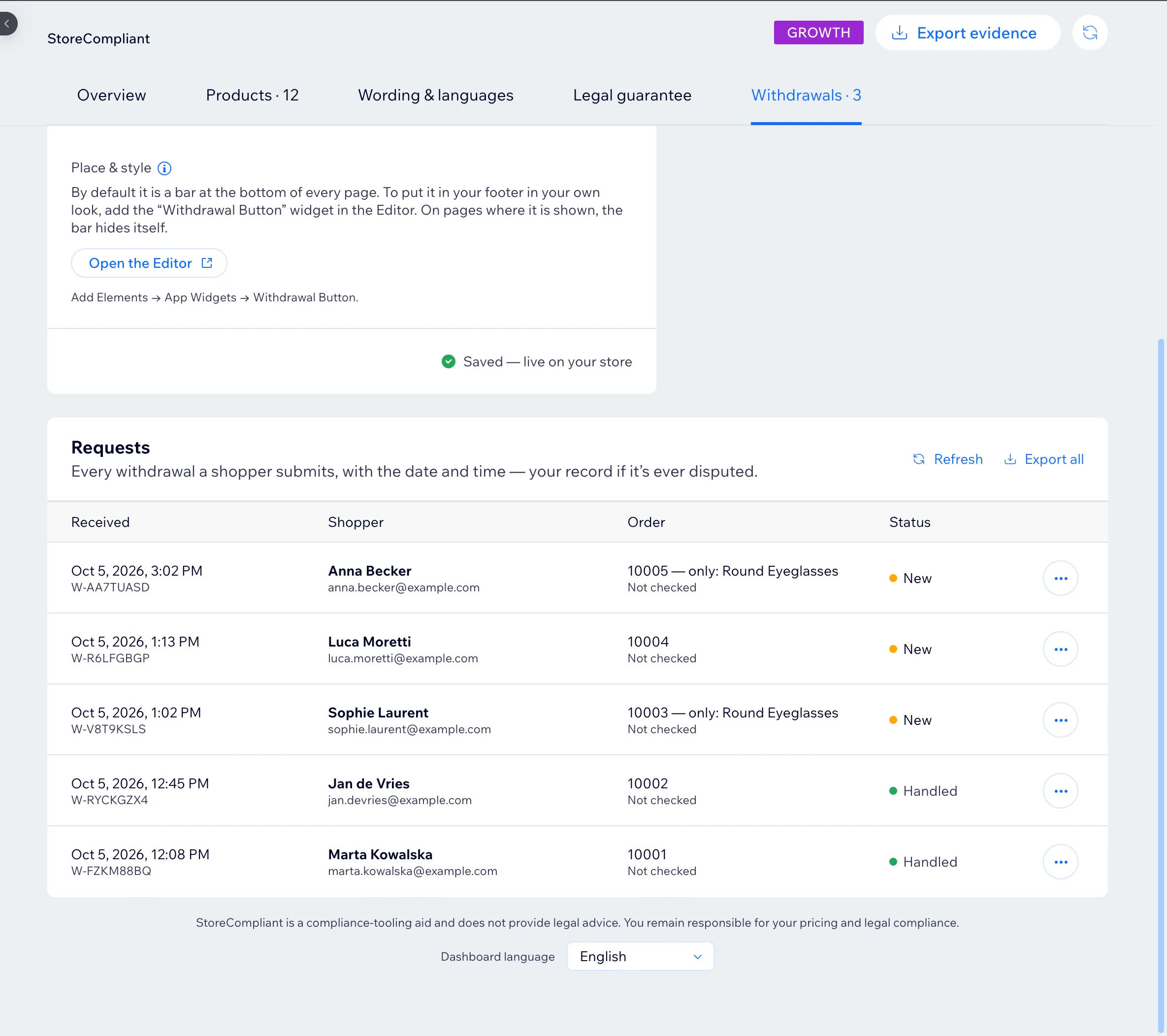
  • A dated trail for withdrawals. The withdrawal button sends the shopper a confirmation and gives every request a reference number in your log.
The Withdrawals tab of the StoreCompliant dashboard: a log of requests with date and time, reference number, shopper, order number and status.

Limits

What StoreCompliant does not do

Knowing where a tool stops is part of choosing it.

  • It does not check your prices for you. It records them, shows the 30-day figure and flags a crossed-out price it has no record for. Whether a promotion is right is your call.
  • It is not legal advice. It is a compliance aid. How a rule applies to your shop and your products is a question for a lawyer.
  • It does not know prices from before it was installed. For a product already on sale at install it shows nothing until you import the earlier prices.
  • It does not process withdrawals. It takes the request, confirms receipt and logs it. Refunds and returns stay with you.
  • It covers three notices, not everything. Product safety information under the General Product Safety Regulation (GPSR), cookie banners, privacy policies, terms and conditions and tax are outside what it does.
  • It is not on every platform. See where it runs today.

See all features See pricingQuestions and answers

Put the three EU notices on your storefront

Free for up to 50 products. Set-up takes a few minutes and needs no code.

Shopify is in development and WooCommerce is planned. See all platforms.