Skip to content

Regulation (EU) 2023/988 (GPSR) · in force since 13 December 2024

Product safety information (GPSR), on your product pages

Since 13 December 2024, an online offer to EU consumers has to show who made the product and how to reach them, who is responsible for it in the EU, what identifies it and which warnings go with it. StoreCompliant helps you display this as a “Product safety information” block on every product page, in the shopper’s language: you enter each maker once, products follow their brand, and warnings are shown as you entered them.

Free on every plan. Available for Wix Stores.
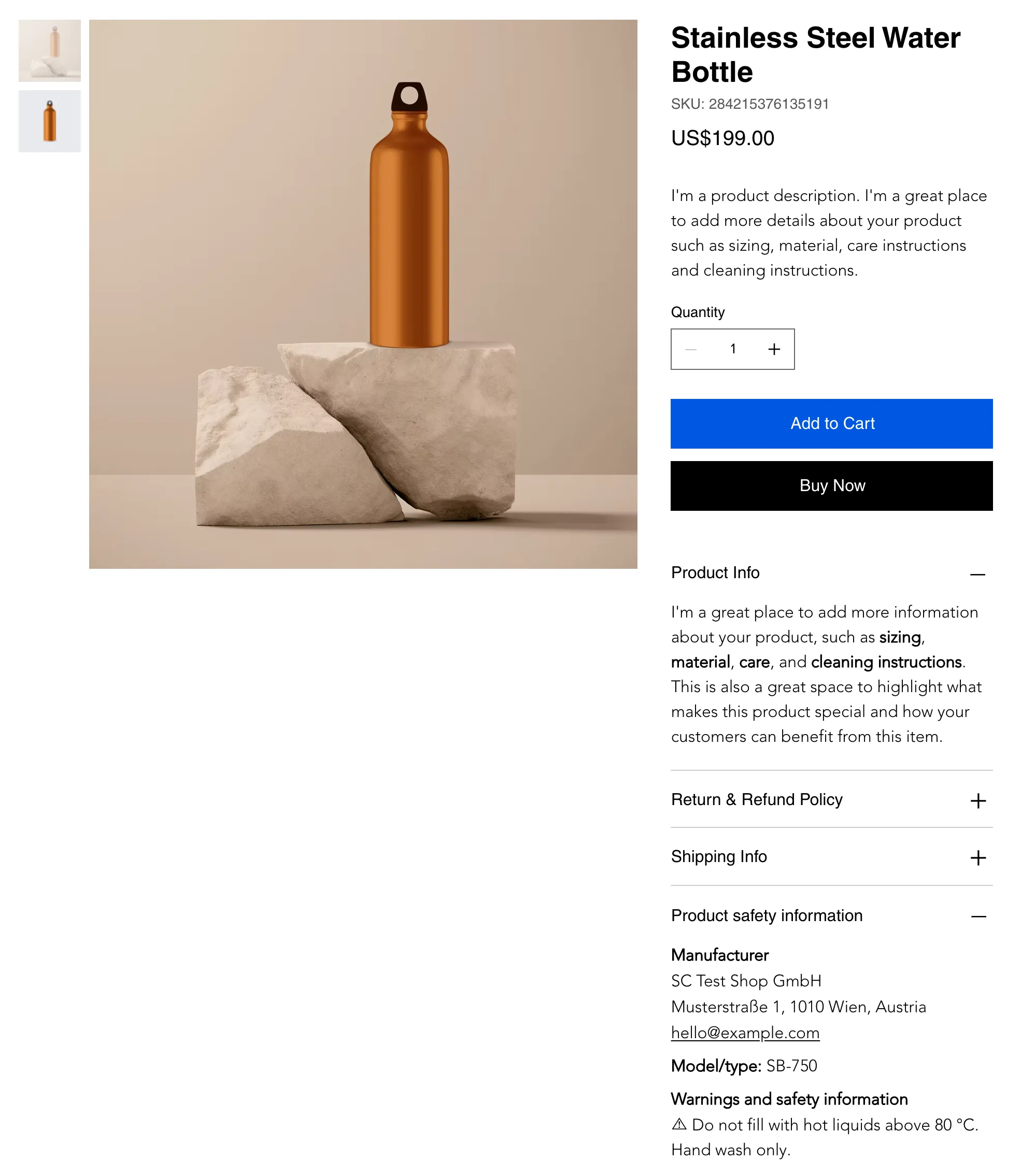
A Wix product page with a “Product safety information” section under Shipping Info, open and styled like the shop’s own information rows: the manufacturer’s name, postal address and email, the model and a warning.

The rule

What Article 19 asks for

The General Product Safety Regulation applies to consumer products sold online to consumers in the EU. One of its articles is about the offer itself: what a product page has to show.

Article 19 of Regulation (EU) 2023/988 says that where products are offered online, the offer must “clearly and visibly indicate at least the following information”:

  • The manufacturer. Its name, registered trade name or registered trade mark, and the postal and electronic address at which it can be contacted.
  • The responsible person in the EU. Where the manufacturer is not established in the EU: the name, postal and electronic address of the responsible person under Article 16(1) of the GPSR or Article 4(1) of Regulation (EU) 2019/1020.
  • What identifies the product. Information allowing the identification of the product, including a picture of it, its type and any other product identifier.
  • Warnings and safety information. Any warning or safety information that has to be on the product, its packaging or an accompanying document, in a language consumers can easily understand, as determined by the Member State in which the product is sold.

The Commission’s guidelines on the GPSR say that an “electronic address” can be an email address or a dedicated section of a website that lets consumers contact the operator directly; a website on its own is not enough. The regulation applies since 13 December 2024.

Guide: GPSR product safety information for online shops

On your storefront

How the app shows product safety information

A “Product safety information” block on the product page, inline and never a pop-up. The labels are in the shopper’s language; the names, addresses and warnings are shown as you entered them.

Show as

Collapsed, open or both

Collapsed, and open on products that have warnings, is the recommended default. You can also keep the block always open or always collapsed.

Style

Three styles

Plain text, a card with a border, or “like your info sections”: one more row like the product page’s own “Product Info” and “Shipping Info” sections, in their font, colour and lines.

Place

Under the price, or where you put it

By default the block sits under the price together with the 30-day price line. Place the separate plugin instead and the block under the price steps aside.

Optional

A plugin you place yourself

The “StoreCompliant Product Safety” plugin can go anywhere on the product page from the Wix Editor, for example below the product details or with the information sections. It has its own settings for show as, text size and text colour. Where it is placed, the block under the price hides itself.

In the shopper’s language

The labels around the information, such as “Manufacturer”, “Responsible person in the EU” and “Warnings”, are shown in any of the 24 official EU languages, using the terms of each language version of Article 19.

As you entered it

Names, addresses, models and warnings appear exactly as you typed them. The app does not rewrite, shorten or translate them.

Free on every plan

Product safety information is included on all plans, the free plan too, within the plan’s product count. Paid plans can show it to EU and EEA visitors only.

In the dashboard

Enter each maker once; products follow their brand

Most shops sell products from a handful of makers. The app is built around that: a maker is entered once, and the products that belong to it are matched by brand.
  • A maker is a name, a postal address and an email address or contact page. Where the maker is outside the EU and EEA, you add the responsible person in the EU; the block shows it only for those makers.
  • Brands do the matching. Each maker lists the Wix brands it makes. A product with one of those brands gets that maker, and so does every new product you add with that brand.
  • A default maker covers products with no matching brand. It can be your own business, for products you make or sell under your own name.
  • Per-product override. Any product can be given a different maker by hand.
  • Model or type. Each product shows a model or type. Where none is entered, the app shows the product’s SKU as the item number.
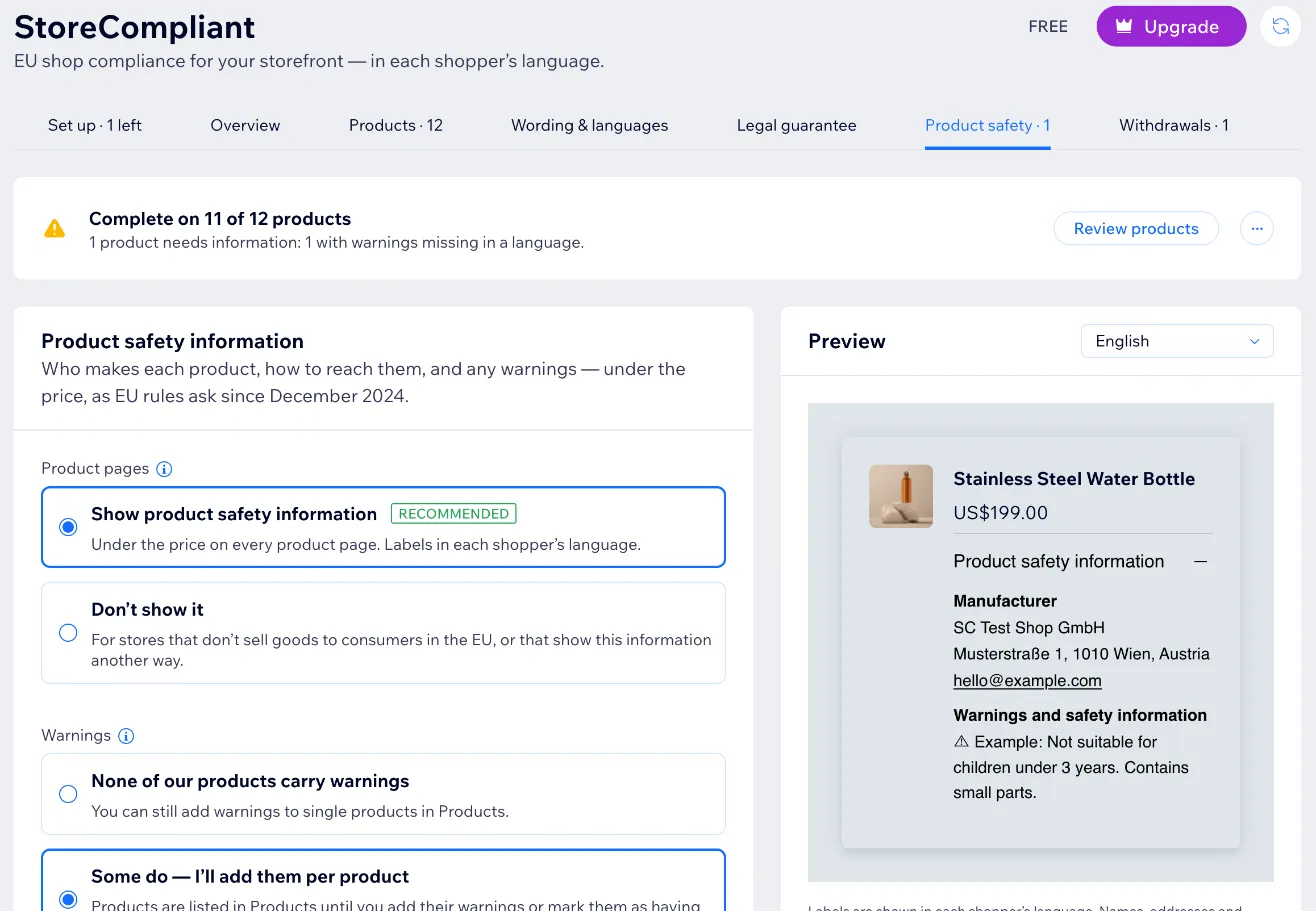
The Product safety tab of the StoreCompliant dashboard: a progress summary (“Complete on 11 of 12 products”), the show and warnings settings, and a live preview of the block.

Warnings and languages

Warnings are copied, never machine-translated

A warning is a safety text that has to say what the manufacturer wrote. The app treats it that way.

  • Warnings are entered per product and per language, copied from the product, its packaging or its instructions.
  • The shopper sees the warnings in the language of the page where you entered them; otherwise the app shows your shop’s main language. It never machine-translates a warning.
  • A product can be marked “no warnings”, or “not covered by the rule” when it is outside the GPSR; the block is then left off that product.
  • The dashboard lists the products that still need safety information and flags warnings that are missing in one of your languages.
  • All product safety information can be exported as a CSV file.

What it leaves to you

The information is shown; its content is yours

  • The app displays maker details and warnings as you entered them. It does not check whether they are correct or complete, and it does not know which warnings a product needs.
  • Whether a product is covered is your call. The GPSR applies to consumer products and lists products it does not apply to; where other EU product rules apply, they take precedence for what they cover. The app lets you mark a product as not covered; it does not decide that for you.
  • It does not register products, carry out safety assessments, label the physical product or its packaging, or handle recalls and accident notifications.
  • The language a warning has to be in is set by the Member State where the product is sold. The app shows the languages you entered.
  • StoreCompliant is a compliance aid, not legal advice. If you are unsure whether or how the rule applies to what you sell, ask a lawyer.

Questions about product safety information

What does the GPSR ask an online shop to show?

Article 19 of Regulation (EU) 2023/988 says that an online offer must clearly and visibly indicate at least: the manufacturer’s name, registered trade name or trade mark and its postal and electronic address; where the manufacturer is not established in the EU, the name, postal and electronic address of the responsible person in the EU; information that identifies the product, including a picture, its type and any other product identifier; and any warning or safety information that has to be on the product, its packaging or an accompanying document. The guide to GPSR product safety information goes through each point.

Since when does the rule apply?

Regulation (EU) 2023/988 applies since 13 December 2024. It is a regulation, so it applies directly in every Member State; some Member States have their own rules on top, for example on languages.

Do I have to enter the manufacturer for every product one by one?

No. You enter each maker once, with its name, postal address and email or contact page. Products get their maker through their Wix brand: each maker lists the brands it makes, and a new product with that brand follows. Products without a matching brand use the shop’s default maker, which can be your own business. You can still override the maker on a single product.

What is the “responsible person in the EU”?

Under Article 16(1) of the GPSR, a product covered by the regulation may only be placed on the EU market if an economic operator established in the EU is responsible for it, for example the importer or an authorised representative. Where the maker is outside the EU, Article 19 asks the offer to show that person’s name, postal and electronic address. In the app you enter the responsible person on the maker, and the block shows it only for makers outside the EU and EEA.

Where does the block appear on my product page?

By default under the price, together with the 30-day price line. If you would rather have it somewhere else, place the separate “StoreCompliant Product Safety” plugin from the Wix Editor, for example below the product details or next to the information sections; the block under the price then steps aside. It is always shown inline on the page, never as a pop-up.

Does the app translate my warnings?

No. Warnings are safety texts, so the app shows them exactly as you entered them, per language. You copy the warnings from the product, its packaging or its instructions for each language you sell in; the app shows the shopper’s language and falls back to your shop’s main language. The dashboard flags a product whose warnings are missing in one of your languages. Only the labels around them, such as “Manufacturer” or “Warnings”, are translated by the app.

Does the app check whether my safety information is correct or complete?

No. It shows the maker details and warnings as you entered them and lists the products that still have no safety information. Whether a product falls under the GPSR, who its manufacturer or responsible person is and which warnings it needs are questions for you and your suppliers. StoreCompliant is a compliance aid, not legal advice.

Does product safety information cost extra?

No. It is free on every plan, within the plan’s product count, like the other features. See pricing.

All questions and answers

Put the four EU notices on your storefront

Free for up to 50 products. Set-up takes a few minutes and needs no code.

Shopify is in development and WooCommerce is planned. See all platforms.